How to Create Product Videos with AI at Scale, without a Video Team
Creating 5 product videos is one thing. Creating 500 to cover new launches, best-sellers, and the long tail of your catalog is another.
Between shoots, editing, and approval rounds, video is still difficult to scale across an entire product catalog. AI is changing that equation: from a product image or the information on a product page, brands can now generate videos in minutes, without organizing a new shoot for every SKU.
The question is what AI can realistically produce e-commerce videos in 2026, and how to integrate it into your ecommerce workflow without compromising on quality.
The 3 biggest challenges to scaling product video
On a product page, video helps shoppers picture the product more clearly: seeing a garment worn, understanding an object’s dimensions, looking at a texture up close, or seeing the product in context.
But three barriers still prevent most brands from rolling video out across their entire catalog.
- Cost. A few hundred euros multiplied by 100, 500, or 2,000 products quickly becomes a significant budget.
- Production time. Between preparation, shooting, editing, and approval rounds, a traditional video project can take several weeks.
- Production capacity. Most ecommerce teams simply do not have the resources to continuously produce video for product pages, social media, paid campaigns, newsletters, and launches.
As a result, video is still often reserved for launches and the most strategic products.
In fashion, for example, only 8% of product pages include video.* Even best-sellers are not systematically covered: just over a third of brands, 34.7%, feature video on the product page of their best-selling item.
Source: IMPACT Commerce x Google, Omnichannel Index 2026, p. 147
.png)
What AI can (and can’t) do for product videos in 2026
The technology is moving quickly, but creating product videos with AI does not mean replacing traditional production altogether.
The key is choosing the right level of production for each type of content.
A hero campaign for an international collection launch can absolutely justify a traditional shoot. Running the same production setup for 200 secondary products in the catalog is much harder to justify economically.
That is where AI brings the most value: helping brands cover the long tail of their catalog.
The real shift: from prompting to an ecommerce-first workflow
AI creation is still often associated with a blank text box where users are expected to come up with the perfect prompt.
For ecommerce teams, that model quickly reaches its limits. Someone responsible for enriching hundreds of product pages does not need to become a prompting expert. They mainly need to know:
- which product to feature;
- what kind of output fits the brand;
- whether the final content is ready to publish.
A more practical approach is to start with a use case, rather than a free-form prompt.
That’s the approach behind JOIN AI Studio: select a product from your catalog, then choose the type of content you want to create — a product showcase, a lifestyle scene, a virtual try-on, a close-up, and so on.
The tool then guides you through concrete parameters such as:
- the main product;
- the environment;
- the style;
- the model;
- complementary products.
For a fashion brand, for example, if you are generating a video for a pair of shorts, you can select the T-shirt or accessories shown in the scene from your own catalog instead of letting the AI generate random items.
Prompts do not disappear altogether. They become an option for more specific creative needs, rather than the mandatory starting point for every generation.
4 AI video use cases worth testing in ecommerce
1. Turn a product image into a video
This is one of the easiest use cases to scale.
Starting from an existing product image, AI can generate a short video that showcases the product, places it in context, or draws attention to specific details.
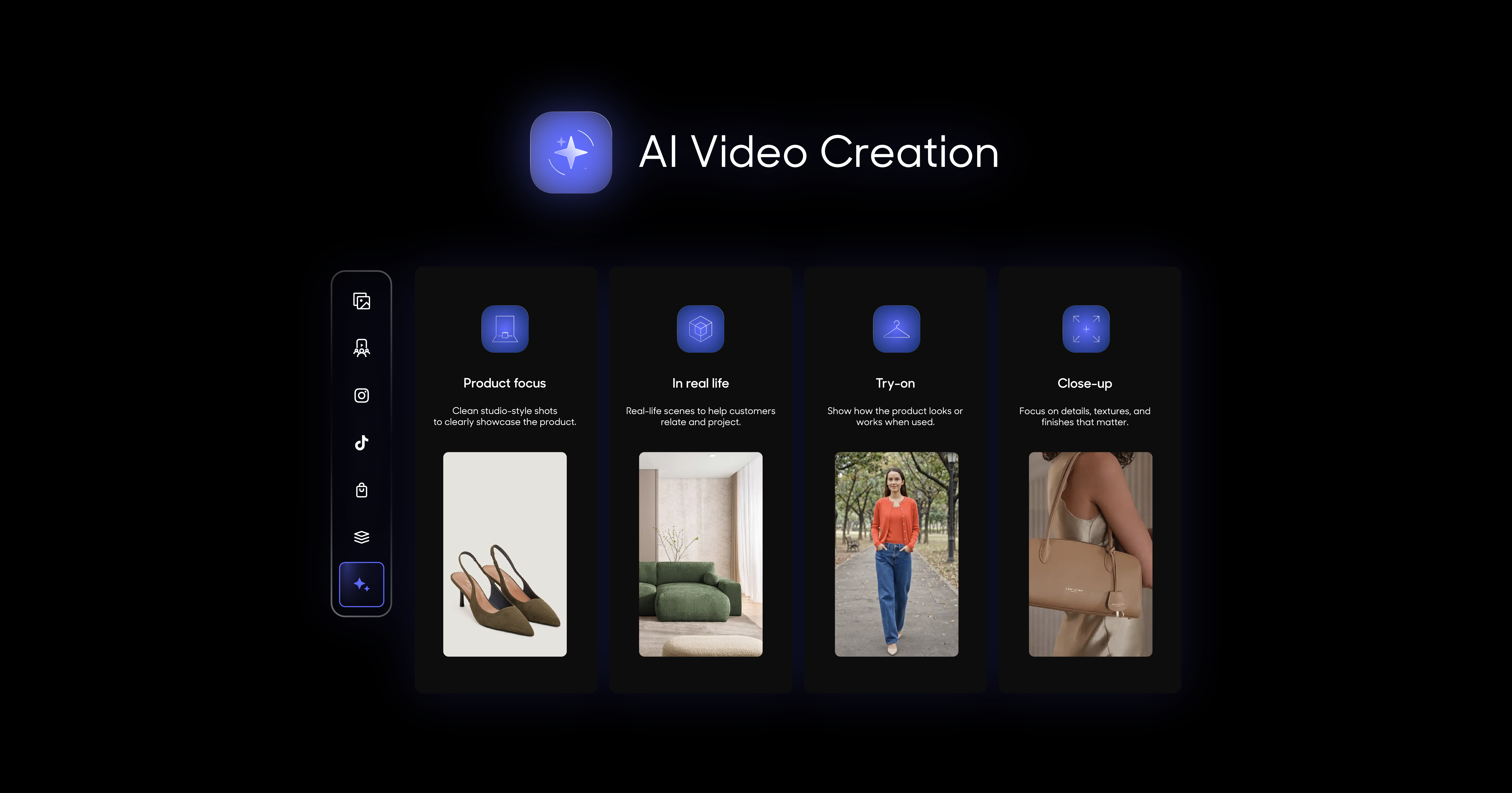
JOIN AI Studio includes several use cases depending on the result you want:
- Product Focus to keep the product front and center;
- In Real Life to place it in a realistic environment;
- Close-Up to highlight materials and details.
The advantage is simple: you can build from assets that already exist in your catalog instead of organizing another shoot for every product.
2. Create a virtual try-on
For fashion, beauty, and accessories, Try-On makes it possible to show a product on a virtual model without organizing a new shoot.
With JOIN AI Studio, brands can choose elements including:
- the model;
- the environment - studio, street, lifestyle setting, etc.;
- other products featured in the scene.
A fashion brand generating a video for a pair of shorts can, for example, choose the T-shirt or accessories worn by the model from other products in its catalog.
This makes it possible to produce more content while retaining control over both the products shown on screen and the overall brand universe.
3. Repurpose and extend your existing content
Already have a strong UGC video? It can become the starting point for new variations: shorter formats, subtitles, different crops, or versions adapted to different touchpoints.
The goal is to get more value from content you already have, rather than organizing a new shoot every time.
4. Generate more variations to test what works
The lower marginal cost of AI-generated video also changes how brands can approach creative performance.
Instead of producing one video and hoping it performs, teams can test several approaches around the same product.
For example:
Version A: focused on the product and its details.
Version B: shown in a lifestyle setting.
Version C: shown on a model.
You can then compare performance using metrics such as completion rate, clicks, add-to-cart, or conversion.
Which AI tools should you use to create product videos?
The right AI video tool for ecommerce depends primarily on the type of content you want to create, where you plan to use it, and how much control you need over the final output.
Among these options, an AI Studio designed for ecommerce like JOIN stands out through its connection to the product catalog, shoppable distribution, and performance measurement.
How to speed up product video production with AI: a JOIN AI Studio workflow
To scale product video, generating the content is only one part of the equation. AI creation needs to fit into a repeatable workflow.
With a tool like JOIN AI Studio, the process can be broken down into a few steps:
- Connect your product catalog to automatically pull in product visuals, descriptions, and related information.
- Prioritize the right products: new launches, best-sellers, or products that are still underserved by video.
- Choose the use case and configure the output using a clean, accurate product image: product showcase, lifestyle setting, Try-On, environment, model, and more.
- Review the generated content to make sure the product is represented accurately and the output is consistent with your brand.
- Publish and measure performance, then roll out the formats that work best across other products.
The goal is to move from one-off video production to a continuous loop:
create → distribute → measure → optimize.
Typical generation time: under 10 minutes in most cases, compared with several weeks for a traditional video production cycle.
How brands are using AI-generated product video
Aigle has rolled out its first videos created with AI artists directly on product pages using JOIN. The goal is to move beyond creating rich content only for a handful of hero products and gradually expand video coverage across the catalog.
Adam & Eve also uses JOIN AI to generate product content at scale from its catalog feed. Product images, descriptions, and SKU information feed into the generation process; the resulting content can then be distributed on product pages, with its impact on conversion and add-to-cart measured.
In both cases, the challenge is the same: increase content output while retaining control over quality, using assets that already exist and without organizing a separate shoot for every product.
Want to create AI product videos from your own product pages and images? Discover JOIN AI Studio, built to help ecommerce brands create product video at scale.
FAQ: AI product video and ecommerce
Is AI-generated video good enough for a professional ecommerce store?
Yes, for many product-focused use cases. Today’s tools can create convincing videos to showcase a product, show it on a model, or place it in context.
Human review is still essential before publishing to make sure the product is represented accurately.
Can AI completely replace product shoots?
That is not necessarily the goal.
A hybrid approach is often more effective: keep traditional production for hero brand campaigns and use AI to create richer content across a much larger share of the catalog.
Do you need to know how to write prompts to create AI product videos?
Less and less. Tools such as JOIN AI Studio can start from a use case and concrete parameters (product, environment, model, output type) rather than requiring a free-form prompt.
Prompting is still useful for more specific needs, but it does not need to be a core skill for an ecommerce team.
How much does JOIN AI Studio cost?
JOIN’s AI Video Creation plan currently starts at €99 per month, with up to 35 videos per month. The Growth plan includes up to 100 videos per month, while Scale goes up to 250.
Pricing and limits may change, so check the JOIN pricing page for the latest details.
Can AI-generated videos be used on TikTok or Instagram Reels?
Yes. Videos created in AI Studio are not limited to product pages. JOIN states that content can be used across ecommerce websites, apps, email, social media, and paid campaigns.
How does JOIN AI Studio connect to an existing product catalog?
JOIN can work from a product image, a product page URL, or catalog data. A synchronized product feed can also keep catalog information up to date automatically.
What is the biggest benefit of AI product video for ecommerce teams?
The ability to produce far more video, far faster.
Instead of concentrating production on a handful of best-sellers, brands can gradually expand video coverage across a much larger share of their catalog.
{{cta}}